

Roofing Photo Reports & Before/After Documentation
Document storm damage, completed repairs, and full re-roofs with professional photo reports your clients and insurers can rely on.
Homeowners can't see their own roof. That single fact makes photo documentation one of the most powerful tools a roofer can offer — whether you're filing an insurance claim, walking a homeowner through the damage, or showing the quality of your completed installation. SnapFlow Pro puts that capability in your pocket.
From hail damage assessments to full shingle replacements, SnapFlow Pro lets you capture photos at every stage of the job, organize them by project, and generate a branded Before & After report the homeowner can actually follow. Instead of emailing a zip file of random photos, you send a clean document that tells the story of the work.
For insurance claim documentation, clear timestamped photos organized into a professional report carry far more weight than a disorganized camera roll dump. SnapFlow Pro makes it easy to photograph the damage systematically — ridge line, field, flashing, gutters — and package it into a report on the spot.
The app works completely offline, which matters on roof peaks where cell signal drops. Capture everything you need, then share the finished report with the homeowner or adjuster before you leave the property.
Roofing contractors who deliver a professional photo report alongside their invoice see faster approvals and fewer follow-up calls. Homeowners who can't see their own roof rely entirely on your documentation — a well-organized Before & After report builds the trust that earns repeat business and referrals.
Why Roofers Choose SnapFlow Pro
Document Damage Professionally
Photograph storm damage, missing shingles, failing flashing, and water intrusion systematically — then deliver a report that supports the insurance claim.
Show Homeowners the Transformation
A side-by-side Before & After of the old weathered roof versus the new installation is one of the most compelling referral assets a roofing contractor can have.
Works Offline on the Roof
No Wi-Fi, no cellular signal, no problem. SnapFlow Pro works anywhere and syncs when you're back online — so you never lose a photo.
Example Before & Afters
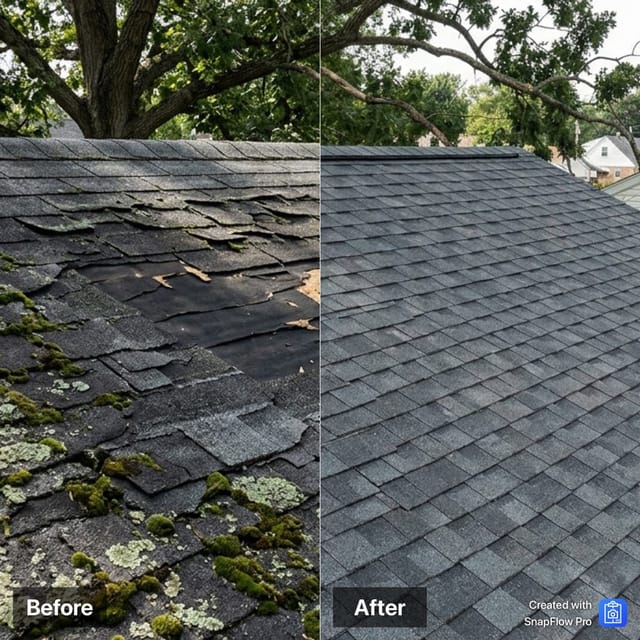
Sample images created using Gen AI. SnapFlow Pro helps you make Before & Afters like these from your own project photos.
Frequently Asked Questions
Also used by